
How to Choose a Solar Security Camera With No WiFi
What “No WiFi” Really Means for a Solar Security Camera
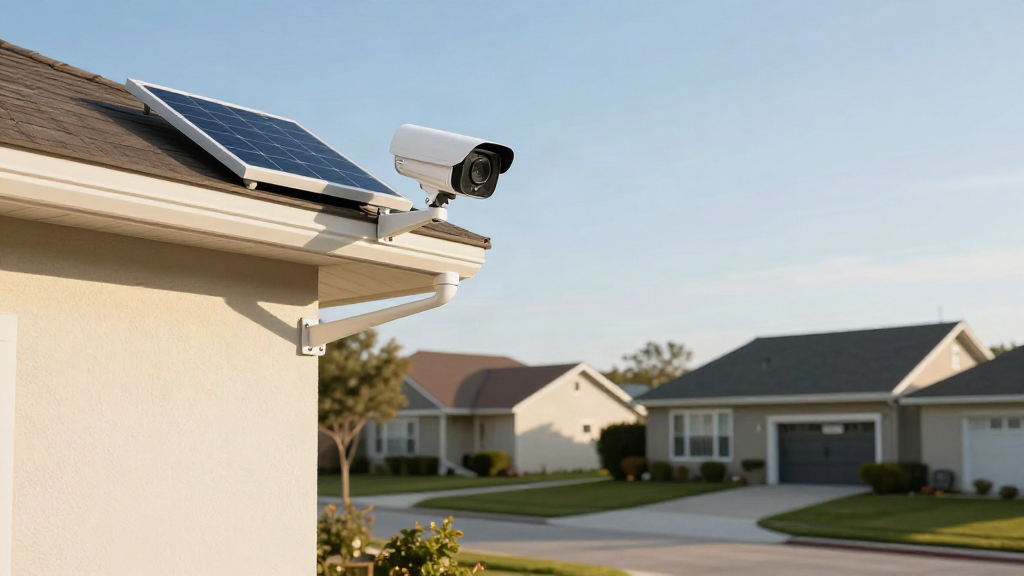
A solar security camera that runs without WiFi does not mean it works with no connection at all. It means the camera talks to the internet through a mobile network (usually 4G) instead of your home router, and it draws its power from a small solar panel rather than a wall socket. The name for this setup is often “4G solar camera” or “wire-free camera”, and it is built for the exact places where cables and WiFi are inconvenient.
That distinction matters because it changes everything about how you set the camera up and where you can put it. No WiFi means no dead zones near the router, no ethernet cable, and no electrician to run power to the far end of the garden. Instead, you get a camera that lives almost anywhere the sun reaches.
For busy families, this is the practical appeal: one device, one mounting bracket, and a view of the spots that keep you up at night, whether that is the driveway, the front gate, or a rental property across town.
Solar Power, 4G Connectivity, and Battery Life Explained
Before you compare models, get comfortable with the three systems doing all the work. They are the reason a no-WiFi camera can stay online for months without you touching it.
Solar power
The solar panel on top of the camera trickles charge into an internal battery throughout the day. On a bright day the panel can keep the battery topped up on its own, so a fully charged camera may run indefinitely in good sunlight. In shadier spots or during long stretches of grey weather, the battery carries the load and slowly drains. Look for a panel that is large enough to recover quickly after a cloudy week, and check how many hours of direct sun the manufacturer recommends.
4G connectivity
This is what replaces WiFi. A SIM card inside the camera connects to a mobile network, so the feed and alerts reach your phone anywhere there is coverage. Before buying, confirm two things: that the camera supports the mobile bands used in your area, and whether it comes with a data plan or needs a SIM and plan of your own. Coverage at the camera’s location is the single most important check, so test your phone’s signal where you plan to mount it.
Battery life
Even with a solar panel, the battery size and how the camera uses power decide your real-world runtime. Cameras that record constantly will drain faster than ones triggered by motion. Rechargeable batteries rated for months of standby give you the best balance, and a model that lets you check the battery level in the app means no surprises.
Step-by-Step: How to Choose the Right Camera
With those three systems understood, work through this shortlist before you add anything to your cart.
-
Start with coverage. Stand where you want the camera and check your mobile signal on a phone. If the bars are strong, a 4G camera will work well there.
-
Decide on resolution. Look for at least 1080p. Higher resolution helps you read a number plate or recognise a face, but it also uses more data and battery.
-
Pick a storage option. Most no-WiFi cameras save to a microSD card, a cloud plan, or both. Local cards avoid ongoing fees; cloud storage survives a stolen camera. Choose based on how much you want to pay monthly.
-
Check the field of view and night vision. A wide lens covers more of the yard, and infrared or colour night vision keeps the picture usable after dark, when many incidents actually happen.
-
Confirm the smart features. Motion alerts, person detection, two-way audio, and a siren are the features families use most. Just make sure alerts can be tuned so a passing cat does not wake the whole house.
-
Read the warranty and weather rating. An outdoor camera should be rated for rain and dust (look for an IP65 or higher rating) and come with a replacement warranty against defects.
Installation, Storage, and App Monitoring
Installation
Mounting a wire-free camera is a screwdriver-and-bracket job. You position the panel to face the sun, fix the bracket to a wall, fence, or post, and switch the camera on. Because there is no cabling to run, you can move it later if you find a better angle. Keep the lens below the level of nearby branches so wind does not set off constant alerts.
Storage
Decide early whether you are using a memory card, the cloud, or both, and set the camera to overwrite old footage automatically so it never fills up. If privacy matters to you, a local card keeps recordings in your hands; a cloud plan keeps them safe even if the camera disappears.
App monitoring
The companion app is where the camera becomes genuinely useful. From your phone you can watch live, review clips, talk through the speaker, and adjust alert sensitivity. Set a schedule for when you want notifications, so daytime motion at the front gate does not buzz your pocket during school pickup. Test the app on the same mobile network the camera uses before you rely on it.
The Quick Checklist Before You Buy
A dependable solar security camera that works without WiFi comes down to four things: strong mobile coverage where you mount it, a solar panel that keeps the battery healthy, storage that suits your privacy and budget, and an app you actually enjoy using. Get those right and you can watch over the places WiFi never reached, all from the phone in your pocket.
For parents juggling school runs, work, and everything in between, that peace of mind is worth the few extra minutes of research. Choose carefully, mount it where the sun can help, and let the camera do the watching while you get on with family life.
Leave a Reply